Shopping for nursery gear often starts with a long checklist of bottles, swaddles, and sleep sacks. A reliable baby monitor with camera and audio belongs on that list too, because it changes how confidently you move through the house once the baby is down. 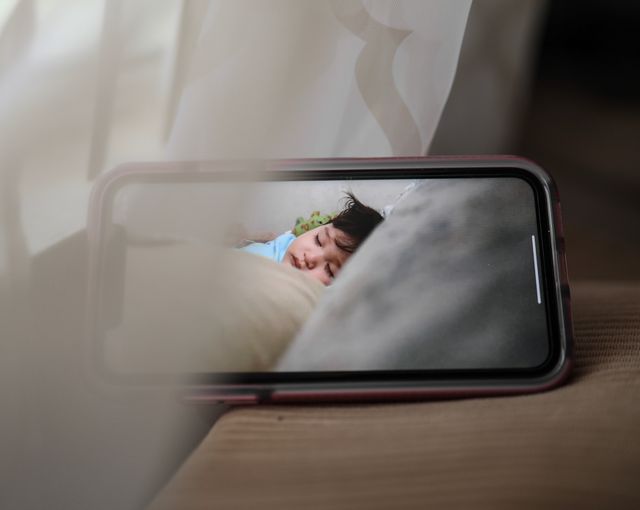 The right unit lets you hear a soft whimper and see whether your child is settling back to sleep or actually needs you, without opening the nursery door every ten minutes.
Models look similar online, yet daily experience can differ sharply. Some parents love a dedicated parent unit they can clip to a pocket. Others prefer checking a phone app from the sofa. This guide focuses on the features that matter in real homes, not just on product pages, so you can narrow options before checkout.
Start With How Your Home Is Laid Out
Before comparing brands, picture where you will use the monitor most. A one-bedroom flat has different needs than a two-story house with the nursery at the end of a hallway. Distance, walls, and router placement all affect performance more than a glossy promo photo suggests.
Ask yourself three quick questions:
- Will you stay on the same floor as the nursery, or move between rooms and floors?
- Do you want a handheld screen, or are you comfortable using your phone?
- Is your home Wi-Fi strong near the crib, or spotty in that corner?
Honest answers here save returns later. A monitor that works beautifully in an open-plan loft may struggle behind thick plaster walls on an older property.
Camera Quality After Dark Matters Most
Most monitoring happens at night, yet many buyers judge picture quality from bright daytime demos. Night vision is the feature you will rely on during the newborn months, when you are checking feeds, repositioning, or deciding whether a noise was a full wake-up.
Look for a feed that stays clear in low light without washing out the crib. Grainy black-and-white video makes it harder to tell a yawn from a cry. If possible, test night mode in a dim room during your return window rather than trusting marketing screenshots alone.
Field of view matters as babies grow. A fixed lens aimed at a newborn bassinet may miss a rolling infant who shifts toward the rail. Pan, tilt, and zoom are not essential for everyone, but they become useful once your child moves around the crib.
Audio Features That Reduce False Alarms
Clear sound is only half the story. Sensitivity settings determine whether you hear every blanket rustle or just meaningful cries. Out of the box defaults often lean too sensitive, which leads to alert fatigue by the third night.
Two-way audio is worth prioritizing if you like soothing from the hallway. A calm voice through the speaker can resettle a baby without a door opening and a blast of hallway light. Volume on the parent side should stay comfortable at low levels so midnight checks do not wake a partner in the same room.
Some systems add white noise playback or lullabies. Helpful for some families, optional for others. Treat extras as bonuses after core video and audio performance feel solid.
Dedicated Signal vs Wi-Fi: Pick Your Connection Style
Monitors generally fall into two connection styles, each with trade-offs:
| Style | Best for | Typical advantage | Watch for |
| Dedicated radio frequency | Same-floor use, older homes, parents who want a separate screen | Stable link without competing for Wi-Fi bandwidth | Limited remote viewing away from home |
| Wi-Fi / app-based | Traveling caregivers, multi-device households | Check-in from phone or tablet anywhere on your network | Depends on router placement and network congestion |
Neither choice is automatically better. Parents who want simplicity often prefer a parent unit that pairs directly with the camera. Families who share nighttime duty across phones may accept a bit more setup in exchange for flexible viewing.
Range Testing Beats Spec Sheet Numbers
Manufacturers list range figures measured in open space. Real nurseries have walls, mirrors, and kitchen appliances in between. Before you mount anything permanently, run a simple walk test: leave the camera where you plan to install it, then carry the parent unit or phone to the farthest spot where you expect to use it, including the garden or basement if that applies.
If the feed stutters or drops, note where it happens. That tells you more than any marketing claim about feet or meters. For larger homes, consider whether you need a model known for stronger penetration or a mesh Wi-Fi upgrade near the nursery.
Multi-Camera Setups for Growing Families
One camera works until it does not. Twins, toddler-plus-newborn households, or split nap schedules often push parents toward systems that support multiple feeds on one screen. Check how many cameras the base unit accepts and whether the interface toggles cleanly between rooms.
Split-screen views show two spaces at once, which some caregivers love and others find cluttered on a small display. Single-feed toggling keeps the picture larger but adds a tap each time you switch rooms. Match the style to how you naturally check on children during a busy afternoon.
Portability, Battery, and Nighttime Habits
Parent-unit battery life is easy to overlook until it dies during a 2 a.m. check. Look for a charging routine you can stick to, such as docking the handheld screen each evening when you plug in your phone. Lightweight units that clip to a waistband or sit in a pocket are easier to carry during daytime naps while older siblings play elsewhere.
Cord management around the crib deserves attention too. Mount cables high and along walls, well out of reach once your baby can pull up. A downward camera angle roughly three to five feet above the mattress usually keeps the whole sleep surface in view while staying safely above grabbing height.
A Short Setup Checklist for Week One
Even a well-reviewed monitor disappoints if setup is rushed. Use the first few nights to tune rather than assume defaults are perfect:
- Adjust audio sensitivity gradually over three nights instead of all at once.
- Confirm night vision covers the full crib, not just one corner.
- Test two-way audio from the kitchen or living room, not only beside the door.
- Charge the parent unit when it drops below half battery.
- Wipe the lens weekly; dust blurs night vision faster than people expect.
Small tweaks early prevent the frustration of thinking a product failed when it simply needed calibration for your baby’s sleep sounds and your home layout.
Matching Features to Your Actual Routine
New parents usually benefit most from sharp night vision, sensible alerts, and simple controls they can use half-asleep. Larger homes should prioritize connection stability over bonus apps. Families with more than one child may get more value from multi-camera support than from extra sensors they never configure.
For a structured walkthrough of camera-and-audio priorities, including multi-room coverage and connection types, this guide on choosing a baby monitor with camera and audio breaks down the same decisions from a parent-first perspective. Pair that framework with hands-on testing in your own nursery, and the choice becomes less about spec lists and more about fit.
Final Takeaway
The best monitor is the one that matches how your household actually sleeps, moves, and shares nighttime duty. Compare night vision in the dark, test range where you live, and decide early whether you want a dedicated screen or phone-based viewing. Get those basics right, and the monitor fades into the background as a quiet helper rather than another gadget to troubleshoot when you are already tired.
Take your time during the first week to adjust sensitivity, confirm mounting angles, and learn your baby’s normal sleep sounds. That small investment upfront pays off in calmer nights and fewer unnecessary trips to the nursery door.
More Tips on Keeping an Eye on Your Baby:
